|
Payroll processing represents a
Mission-Critical component of your Staffing Agency.
MicroStaffer's Payroll module will empower your company with an unparalleled
advantage that will allow for virtually limitless growth.
With it's Central-Point-Of-Entry concept, all
staffing and scheduling data flows directly into the Payroll module from where
checks can be generated and printed with the click of
the mouse and with no additional data entry.
MicroStaffer does all the work!
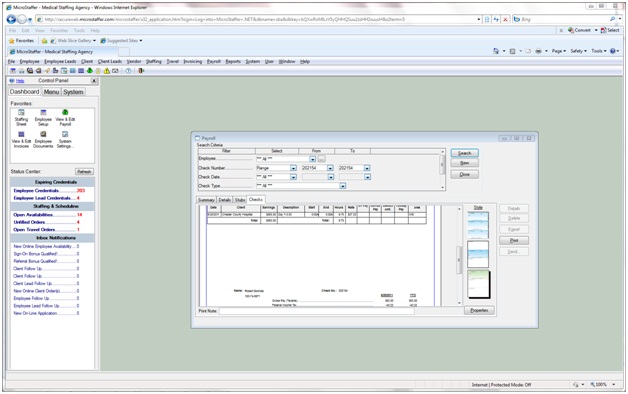
From the Payroll Windows you can:
- Enter Payroll rates by Shift, Day-Of-Week,
Employee Type(s), Work Area(s) and even by individual
employee(s). MicroStaffer even allows for variable
break periods as well as Blended Rates (i.e. Shift Diff.
Rates).
- Generate Individual or Batches of Checks
with the Click of the Mouse and with no additional data
entry.
- Generate Daily pay, Weekly and even Advance
or Insta-Checks.
- Choose between Gross Only pay or a fully
Taxed payroll. MicroStaffer's Tax Library offers you
the ability to do a 100% Taxed Payroll including Federal,
Fica, Medicare, 50 States, Local Taxes and and custom
deductions you wish such as 401K, Garnishments etc.
- Calculate and apply Overtime and Holiday
rates on checks.
- Choose to Print checks, Direct Deposit or
Export to ADP
- Add additional line items (e.g.. Travel or
Meal Allowances etc.)
- Run Payroll and Payroll Tax Reports and
Generate W2's using Interface with Accountability.
- Export Payroll data into various back
office systems such as Peachtree, QuickBooks, Microsoft
Great Plains and Business Works.
*** Please note QuickBooks does not allow for direct
importation of any type of payroll transactions from ANY
external system including MicroStaffer. While it is
possible to import Tax Payroll checks from MicroStaffer
into QuickBooks, these transactions are imported into QuickBooks
in the form of manual checks and the individual earnings
and deductions are posted to the GL accounts specified in
the MicroStaffer export setup for QuickBooks. While
this will post the checks to the checking account and
update your GL in QuickBooks, you will NOT be able to run
any type of Payroll reports (940, W2 etc.) in QuickBooks
based on Payroll data from MicroStaffer.
Like every feature in MicroStaffer, the
Payroll Module is simple and easy to understand and user friendly.
|